OBD2 Car Scanner: Torque ELM
- 4.1
- Rating
- 500.00K
- Installs
- Free
- Price
 Analysis by App-foxy
When a warning light appears on the dashboard, most drivers face an awkward choice: visit a workshop immediately, or keep driving while wondering whether the problem is serious. OBD2 Car Scanner: Torque ELM is designed for that uncomfortable moment. It turns an Android phone and a compatible Bluetooth OBD2 adapter into a practical diagnostic companion, with access to fault codes, live vehicle information, and readiness checks.
I see its strongest appeal in the first week. Connecting a scanner, watching engine data change in real time, and discovering what the car is reporting feels useful straight away. The app is free to install, aimed at everyone, and comes from MONIQ TAP., CO LTD. Its current version is 3.2, and it works on Android 8.0 or later. That makes it approachable for people who want to understand their car without immediately buying professional workshop equipment.
Still, the real question is not whether the app is interesting for an afternoon. It is whether it earns a permanent place on your phone after the novelty fades. My answer is yes for owners who want occasional diagnostic control and basic maintenance awareness, but with an important condition: you need a compatible adapter and realistic expectations about what a phone-based scanner can actually tell you.
You May Also Like

 Google Keep - Notes and lists
Google Keep’s Quiet Growth Shows the Appeal of Simpler Notes
As mobile work gets busier, Google Keep keeps winning a simple contest: capture a thought quickly, find it later, and get on with the day.

 Blood Strike: 2.5 Anniversary
Blood Strike’s Loadouts Turn Every Drop Into a Tactical Gamble
A close look at Blood Strike’s custom loadouts: how fast access to signature weapons reshapes its battle royale rhythm, rewards preparation, and narrows the gap between fights.

 Pandora - Music & Podcasts
Pandora’s Music Is Easy to Start, but Harder to Recover
Pandora’s strength is its low-effort path from a seed to a station. Its weak spot is how much confidence it asks you to place in connection, setup, and quiet recovery.

 8 Ball Pool
 Is Built on Rivalries, Rematches, and Routine
A close look at the rivalries, rematches, shared routines, and unanswered safety questions that turn a quick pool match into a persistent mobile community.

 Samsung Music
’s Quiet Strength Is Playing What You Already Own
Its reach comes less from spectacle than from dependable access to a personal library. That simplicity is both the app’s strongest retention engine and its ceiling.

 AccuWeather: Weather Radar
AccuWeather Review: A Quick, Clear Forecast for Everyday Decisions
For everyday plans, the best forecast is the one you can understand quickly. AccuWeather makes rain timing, radar, and local conditions easy to act on, with a few trade-offs.
More From Our News Desk



From first connection to a useful first week
I use the first week to learn the basic route through the app: connect the Bluetooth adapter, find the code or reading I need, and save the useful details before changing anything. That gives me a calmer way to handle an unexpected warning and helps me notice where navigation or technical terms slow me down. Once that routine feels familiar, I can judge what deserves a place in my regular car-care habits.
What the app is good at immediately
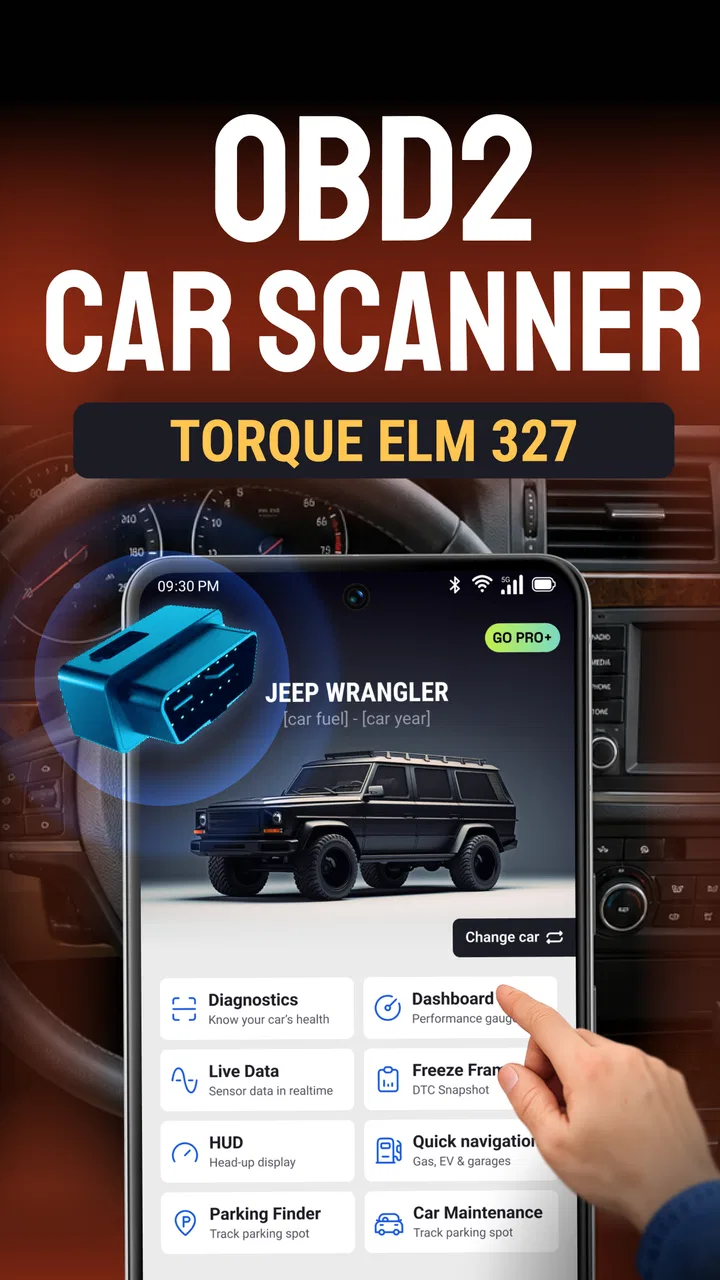
The central workflow is easy to understand. You connect an OBD2 Bluetooth adapter to the car, pair it with the phone, and use the app to inspect information from the vehicle. The most valuable starting point is usually the fault-code screen. If the check-engine light comes on, seeing a code can replace vague worry with a specific starting point for research or a conversation with a mechanic.
That does not mean the code itself is a diagnosis. A code points toward a system or condition, but it does not automatically identify the failed part. A loose connection, wiring issue, sensor problem, or related mechanical fault can sometimes lead to similar symptoms. I would use the app to decide how urgently to investigate, not as permission to replace parts blindly.
The ability to clear codes is convenient, especially after a repair or when a temporary issue has been addressed. However, clearing a code should be the final step of a sensible process, not the first. If the underlying problem remains, the warning may return. More importantly, erasing codes can remove useful information that a technician would want to see. My preferred routine is to record the code and symptoms first, then clear it only when I understand why.
Live data is more valuable when you have a question
The live data dashboard is where the app becomes more than a basic warning-light reader. Instead of looking only at a stored fault, you can observe changing vehicle information while the engine is running. This is useful when a car feels rough, hesitates, idles unevenly, or behaves differently after warming up.
The practical trick is to avoid opening the dashboard without a plan. Watching every available value at once can create noise rather than insight. I would choose a small group of readings related to the symptom, compare them during idle and normal driving, and note what changes when the problem appears. That approach makes the app far more useful than simply staring at moving numbers.
For example, imagine a car that occasionally feels sluggish on the way to work. I could connect the adapter before leaving, let the app display live information, and observe the readings when the engine is cold, after it reaches normal temperature, and during the moment of hesitation. I might not solve the fault myself, but I would have a clearer description for a repair shop than “it felt strange for a few seconds.” That is a modest benefit, but a genuinely useful one.
Readiness checks deserve special attention
The readiness-test function is particularly useful before an emissions inspection or after recent maintenance. Vehicle systems often need driving conditions before their self-checks complete. If those monitors are not ready, a car can arrive at an inspection with no obvious active warning yet still be unprepared for the test.
This is one of the app’s less flashy but more practical uses. Rather than guessing whether a vehicle has completed its internal checks, I can inspect readiness status beforehand and avoid an unnecessary trip. It also helps explain why clearing fault codes is not a harmless reset: doing so can affect the status of those checks and leave the vehicle needing additional driving before it is ready again.
That connection between code clearing and readiness is an important trade-off. The app gives control, but control requires restraint. If I clear a warning simply because the dashboard light is annoying, I may make the car look cleaner temporarily while making its inspection status less convenient.
The adapter matters as much as the app
A common mistake is to judge the entire experience by the app while overlooking the Bluetooth OBD2 adapter. The adapter is the bridge between the vehicle and the phone, so connection quality, compatibility, and reliability can strongly affect the result. If pairing fails or readings drop out, the problem may not be the application itself.
I would treat the adapter as part of the purchase decision, even though the app is free. Before relying on it for a trip to an inspection station, I would test the complete setup while parked. Confirm that the phone connects, the vehicle data appears, and the dashboard remains stable long enough to use comfortably. A short test can prevent a frustrating discovery when the warning light is already on.
The free entry point is appealing, but the app also offers in-app purchases ranging from $4.99 to $59.99 per item. That makes it sensible to begin with the basic experience and decide whether the extra value matches your habits. Someone who checks a car twice a year should think differently from a hobbyist who enjoys monitoring vehicle behavior regularly.
What remains useful after the first month
After the first month, I would keep the app for occasional, purposeful checks rather than leave it open on every drive. Its lasting usefulness depends on whether I can return to a code, live reading, or readiness check without having to relearn the process, especially when I am tired or dealing with an unfamiliar warning. That longer view also makes it easier to decide whether the setup suits my circumstances or whether a simpler option would serve me better.
A maintenance habit rather than a novelty gadget
After the initial excitement, the app’s recurring value comes from specific routines. I would not keep it open on every drive. Instead, I would use it when a warning appears, before a long journey in an older vehicle, after maintenance, or ahead of an emissions inspection. That limited but purposeful role is what makes it easier to keep installed without turning it into another screen demanding attention.
For a household with more than one compatible car, the app can also become a shared diagnostic tool. A driver may not need to know every technical detail, but being able to capture a code and describe when it appeared can improve the first conversation with a mechanic. The useful habit is to record context: engine temperature, driving conditions, recent repairs, and whether the symptom disappeared after restarting. The app supplies the vehicle information; the driver supplies the story.
I also like the idea of using readiness checks as a maintenance calendar trigger. If I know an inspection is approaching, I can check the car early rather than waiting until the last day. If the vehicle has recently had codes cleared, I can allow time for its systems to complete their checks. That is a recurring workflow with practical consequences, not merely a technical curiosity.
Where it compares well with ordinary alternatives
The usual alternative is to visit a parts store or repair shop for a quick code scan. That route can be easier for a driver who does not own an adapter or does not want to interpret any information. The disadvantage is that it is less convenient when the warning returns at home, and it does not put live monitoring or readiness checks in your own hands.
A dedicated handheld scanner is another option. It may feel more dependable in a workshop setting and avoids using a phone, but it is a separate device to store and remember. OBD2 Car Scanner: Torque ELM is more attractive if I already carry an Android phone and want occasional access without buying a specialized display.
Professional diagnostic equipment remains the better choice for complex faults, manufacturer-specific systems, guided tests, and repairs where safety depends on precise information. This app should not be compared with a full workshop scan tool as if they served the same audience. Its advantage is convenience and accessibility; its limitation is that convenience does not turn general OBD2 information into complete vehicle diagnostics.
Who gets lasting value from it
I think the app suits drivers who enjoy being informed but do not want to become mechanics. It is also useful for owners of older cars, people preparing for inspections, and anyone who has experienced an intermittent warning that disappears before reaching a workshop. For these users, the ability to capture information at the right moment can justify keeping the app installed.
It is less suitable for someone who expects a plain-language repair instruction after every code. It is also not the right tool for a driver who dislikes pairing devices, checking connections, or learning the difference between a symptom and a diagnosis. If you only want a professional to handle everything, a workshop remains simpler.
Questions I would settle before relying on it
The first question is whether it works with your vehicle. The app is built around OBD2 Bluetooth communication, so the car, adapter, phone, and software must cooperate. I would verify compatibility and test the connection before treating the app as an emergency solution. Installing it after a warning appears is too late if the adapter cannot connect.
The second question is whether it can turn off a warning permanently. It can clear codes, but that is not the same as repairing the cause. I would never use clearing as a substitute for diagnosis, especially if the car is running poorly, overheating, losing power, or showing other serious symptoms. In those situations, stopping safely and seeking qualified help matters more than resetting the dashboard.
The third question is whether live data is understandable to a beginner. It can be, but only if approached slowly. I would start with the values connected to one symptom, take notes, and avoid drawing conclusions from a single changing number. The app is most helpful when it supports a question that I already know how to ask.
The fourth question concerns cost. The download is free, while optional in-app purchases range from $4.99 to $59.99 per item. I would not pay for extras simply because the dashboard looks interesting. I would first decide whether the app has become part of my actual maintenance routine and whether the additional functions solve a recurring problem.
The small frustrations that can grow over time
The biggest source of fatigue is usually not opening the app; it is the complete setup around it. I need the adapter, a charged phone, a stable Bluetooth connection, and enough patience to interpret what appears. If the adapter is left plugged in, I also need to think about whether it should be removed when the car is parked for a longer period. That makes the experience less effortless than a permanently installed vehicle display.
Another source of fatigue is information overload. A live dashboard can make a driver feel productive while offering no clear action. If I check it without a purpose, I may end up worrying about normal fluctuations or chasing values that have no connection to the original symptom. The best defense is to use a short checklist: what happened, when it happened, which code appeared, and what changed after the repair.
Bluetooth dependence can also be irritating during a rushed situation. A connection that works perfectly in the driveway may need to be re-established after the phone changes, the adapter is moved, or another device claims the connection. This is why I would test the setup periodically rather than waiting for a warning light to create pressure.
There is also a psychological limitation. Having access to diagnostic information can encourage overconfidence. A code may tempt an owner to order a sensor, clear the warning, and assume the job is finished. In my view, the app earns trust only when it encourages better questions and better records, not when it encourages guesswork.
Privacy, attention, and responsible use
Because this is a phone-based tool used around a running vehicle, I would keep the phone positioned safely and avoid interacting with the dashboard while driving. Live monitoring is better handled by a passenger or while parked. The information is useful, but no reading is worth distracting yourself in traffic.
I would also keep the app in its proper role during safety-critical problems. A warning accompanied by smoke, unusual smells, severe shaking, brake concerns, or loss of power calls for immediate caution and professional assistance. Reading a code can help later, but it should not delay a safe response.
My long-term verdict
After the novelty fades, OBD2 Car Scanner: Torque ELM remains worthwhile because its useful moments are tied to real ownership events: a warning light, an inspection, a recent repair, or an intermittent symptom. It is not an app I would open for entertainment every day, and that is not a weakness. Its value comes from being available when the car gives me a reason to ask questions.
The app has reached over 500 thousand installs and holds a 3.9 average from around 11 thousand ratings, which suggests a substantial audience while also reflecting that the experience will not be perfect for everyone. I would read that as a reason to approach it practically: the concept is useful, but the adapter, vehicle compatibility, and user expectations determine how smooth it feels.
For an Android driver who wants an affordable entry into OBD2 diagnostics, the free app is easy to justify. The strongest features are not the novelty of seeing numbers move; they are the ability to preserve fault information, inspect live behavior, and check readiness before an important appointment. Those functions can save time and improve communication with a mechanic.
My recommendation is to install it if you are willing to learn a little and use it as a maintenance aid rather than a magic repair button. Start with a compatible Bluetooth adapter, test everything while parked, and keep notes when a fault appears. If you want complete professional diagnostics with no interpretation required, choose a workshop or dedicated professional equipment instead. If you want a reusable tool for informed ownership, OBD2 Car Scanner: Torque ELM earns its space on my phone.
FAQs for OBD2 Car Scanner: Torque ELM
01What is OBD2 Car Scanner: Torque ELM used for?
OBD2 Car Scanner: Torque ELM is an application designed to help users diagnose car issues by connecting their smartphones to the car’s OBD2 system. It provides real-time data on engine performance, fuel efficiency, and vehicle status, making it an essential tool for car enthusiasts and mechanics.
02How do I connect my phone to the car using this app?
To connect your phone to your car using OBD2 Car Scanner: Torque ELM, you need an OBD2 Bluetooth adapter. Plug the adapter into your car’s OBD2 port, usually located under the dashboard. Ensure Bluetooth is enabled on your phone, then pair it with the adapter through the app’s settings.
03Is OBD2 Car Scanner: Torque ELM compatible with all vehicles?
OBD2 Car Scanner: Torque ELM is compatible with most vehicles manufactured after 1996, as these cars typically have an OBD2 system. However, compatibility may vary based on the car's make, model, and region, so it’s recommended to check your vehicle’s specifications before using the app.
04Does the app require an internet connection to function?
No, OBD2 Car Scanner: Torque ELM does not require an internet connection to function. The app works offline by connecting directly to the OBD2 adapter via Bluetooth. However, an internet connection might be needed for app updates or accessing additional features such as cloud storage.
05What features does the app offer beyond basic diagnostics?
Beyond basic diagnostics, OBD2 Car Scanner: Torque ELM offers features such as real-time data logging, customizable dashboards, fault code reading and clearing, and performance analysis. It also allows users to track fuel efficiency, monitor engine parameters, and set alerts for specific conditions like overheating.
Pros
- Integrates with most car models effortlessly.
- Real-time data monitoring is highly accurate.
- Customizable dashboard for personalized use.
- User-friendly interface for easy navigation.
- Supports multiple languages for global access.
Cons
- Requires a separate adapter for connection.
- Advanced features locked behind a paywall.
- May have compatibility issues with older cars.
- Some data readings can be slightly delayed.
- User support is limited to online forums.

OBD2 Car Scanner: Torque ELM
Gallery